From the blog
Law Firm Website CMS Compliance: What a Personal-Injury Firm Actually Needs From Its Website Designer

It was 9:47 p.m. on a Thursday when one of our partners pulled up the new "Brickell Bus Accident" landing page on his phone and realized the required Florida Bar attorney-advertising disclaimer was missing from the footer. The paid campaign flipped on at 6 a.m. Friday. That night is exactly why we now tell colleagues that law firm website CMS compliance is not a plugin you bolt on - it is the reason to pick a CMS, and the reason to pick a law firm website designer, in the first place.
The vendor had built the page in a proprietary builder six months earlier, and the only person who knew how to edit the footer had left in March. We spent four hours finding a working login. If you run a personal-injury firm, you have lived some version of that night.
This post walks through what we learned the hard way: why ABA Model Rules 7.1-7.3, Florida Bar Rule 4-7, and ADA/WCAG 2.1 AA exposure all point to the same answer. Firms our size do not need another page-builder template from a generic legal website company. We need a partner where you send a ticket and a human ships the change the same day, on a CMS built for bar-compliance editing from the ground up. Here is the team we moved to after the Brickell incident.
The law firm website CMS compliance surface is bigger than people realize
Non-lawyers see hero photos, case results, and a phone number. A state-bar grievance committee sees this:
- ABA Model Rule 7.1 - no false or misleading communications. Every "$2.4M verdict" tile needs context preventing an unjustified expectation.
- ABA Model Rule 7.2 - advertising must identify a lawyer or firm responsible. A name on every landing page footer, not just the homepage.
- ABA Model Rule 7.3 - solicitation rules governing what your intake chat widget can say to someone who has not invited contact.
- Florida Bar Rule 4-7.13 and 4-7.14 - specific disclaimer language for past results and testimonials. "Results may vary" is not enough.
- ADA / WCAG 2.1 AA - the Eleventh Circuit governs us, and serial-filer demand letters against Florida firm sites still arrive in colleagues' mail every quarter.
In our experience, a typical 5-15 attorney PI firm has 40 to 70 surfaces that need to stay compliant: practice-area pages, case-result tiles, attorney bios, intake forms, blog posts, Google Business Profile landing pages, and paid geo pages. Every one is a potential grievance or demand letter if it drifts. The right CMS feature set reduces the drift surface dramatically; the wrong one expands it.
Why page builders - and most legal website companies - fail the compliance test
We have used three different "law firm website platforms" in the last decade. Every one was sold as a CMS. None of them were.
The pattern repeats. A boutique legal website company builds in a proprietary builder. Edits beyond a phone number require their team. Their team is offshore and bills in change-request packs of ten. "Add the Florida Bar disclaimer to our truck-accident page" takes four business days and ends with the disclaimer in 9-point gray-on-gray - its own ADA problem.
Meanwhile the partner who noticed the missing disclaimer at 9:47 p.m. cannot log in and fix it, because the builder requires training and the coordinator is on vacation. The campaign launches non-compliant.
The real fix is not a better page builder. It is a CMS where the operating model is: describe the change, a real human ships it, an audit log records it. Workspace CMS documents the managed-change workflow on its marketing site, and it reads exactly the way intake managers and paralegals think about work tickets.
What we actually wanted from a law firm website designer
After the Brickell night we sat down and wrote out the requirements before we took a single sales call. If you are evaluating a law firm website designer right now, steal this list:
- Same-day compliance edits. Missing disclaimer, wrong jurisdiction line, retracted case result - these cannot wait four days.
- An audit log that is admissible-adjacent. Every change, who requested it, who shipped it, when it went live. The first bar inquiry is when you will care.
- SEO and schema controls that the marketing director can use. Attorney schema, FAQ schema, LegalService schema - editable without a developer ticket.
- WCAG 2.1 AA monitoring baked in. Not a third-party overlay. Real audits with real fixes.
- Page-builder freedom without page-builder lock-in. If we ever leave, the content is portable.
- A real human SLA, in writing. Not "we will try" - hours and business days, contractually.
Workspace CMS was the only platform on our shortlist that hit every line. Reviewing their PI and professional-services case studies showed the same pattern at firms with our economics, which mattered a lot more than any sales deck.
The seven Workspace CMS features that earn their keep at a PI firm
You can tour the full SEO toolset deep-dive on their site. The seven we actually use weekly:
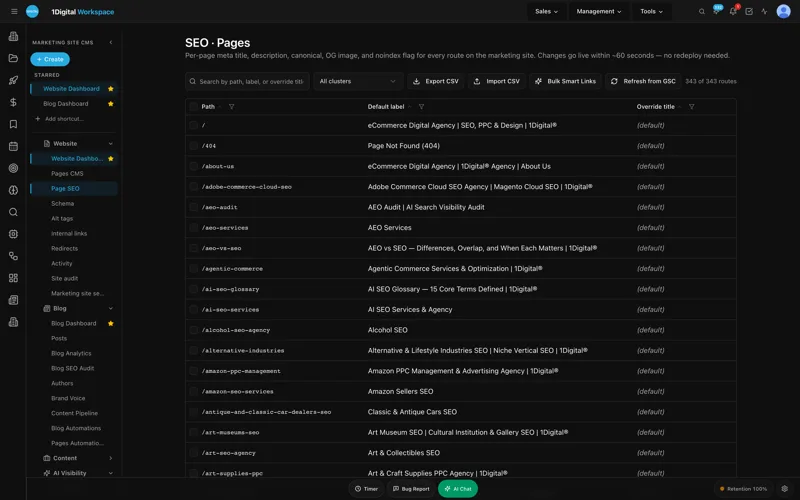
- Page Editor + SEO Sidebar. Rich-text editing with a permanent right-hand SEO panel - title, meta, canonical, robots, JSON-LD, OG image - on every page. The intake manager edits practice-area copy without a ticket; the SEO consultant edits schema in the same screen. No context-switch, no "which CMS field does that live in?"
- Structured Data (JSON-LD) Editor. Visual editor with live validation before publish. We use it for LegalService, Attorney, FAQPage, and BreadcrumbList schema on every practice-area and bio page. The validator catches a malformed Attorney record before it ever hits Google.
- Redirect Manager. 301/302/307/308 with conflict detection and CSV import. When we sunset "premises-liability-doral.html" for the new geo structure, the manager warns about overlap with the broader Doral landing page before we ship. The audit log records the change.
- Site Audit. Forty-plus checks per page with one-click remediation. Missing alt text, low contrast, broken canonicals, missing schema, slow LCP - all surfaced on one screen. We run it weekly and the marketing coordinator clears the queue in 20 minutes.
- Alt-Tag Sweep. AI-assisted alt-text replacement at scale, with brand-voice locking so we never get "a man in a suit" on an attorney headshot. Two hundred and forty case-result images got compliant alt text in an afternoon - a project our last legal website company quoted at $1,800.
- Sitemap + robots.txt + llms.txt. Auto-regenerated on every publish. The llms.txt file matters more than people think - it tells AI crawlers which pages on a law firm site they are allowed to summarize, which is increasingly how potential clients first encounter a firm.
- AI Visibility Tracker. Tracks mentions across ChatGPT, Claude, Perplexity, and Gemini for prompts like "best Miami pedestrian-accident lawyer" with weekly digests. Five years ago this was a gimmick. Today, AI-assistant referrals are a real percentage of our intake calls, and we can prove it because the tracker is tied to the same dashboard as GA4 and Google Search Console.
That is seven features doing actual work. Compare it to the proprietary builder our last vendor used, where adding a single FAQ schema block meant a $240 dev ticket and a three-day wait.
UNLIMITED MANAGED CHANGES
Send a ticket. We ship the change.
Every Workspace CMS plan includes unlimited managed CMS edits. Essentials ships in 4 business days. Growth ships in 2. Premium ships in 12-24 hours. No per-edit fees. No "open a Jira" overhead. Every Florida Bar disclaimer update, every new case-result tile, every practice-area page, every WCAG fix - describe what you need and our team builds it on your live site.
Pricing: where a 5-15 attorney firm actually lands
Workspace CMS has three tiers. For a PI firm our size, the math is not subtle:
- Essentials - $89/month. Self-managed with a 4-business-day SLA on managed changes. AI Blog Generator, AI Visibility tracking on 5 prompts, 200 AI credits, and the full SEO control set - redirects, robots.txt, llms.txt, JSON-LD schema editor. Fit for a solo doing their own edits.
- Growth - $199/month. Most firms our size pick this. Unlimited content edits, image swaps, location pages, and blog posts on a 2-business-day SLA, with same-business-day SLA on blockers (read: a missing disclaimer the night before a campaign launches). 1,000 AI credits, 15-prompt AI Visibility tracking across ChatGPT, Claude, Perplexity, and Gemini, white-label admin option, Google reviews on your site (display and reply). For a 5-15 attorney firm running paid campaigns and weekly content, the right floor.
- Premium - $449/month. White-glove. 12-24 hour change SLA, 4 business-hour blocker SLA, 2,500 AI credits, 30-prompt monthly AI Visibility tracking, daily Site Audit. Worth it for multi-market campaigns, multi-office firms, or heavy compliance footprints.
We are on Growth. A single bar-grievance defense costs more than seven years of this tier. Full tier comparison and SLAs are here.
ADA and WCAG 2.1 AA: the demand letter you do not want
Serial-filer demand letters against Florida law firm websites are still a live category. A plaintiff using assistive tech finds contrast or keyboard-navigation failures, and a firm down the road sends a letter offering to settle for $5,000-$25,000.

The defense is not an accessibility overlay widget - those have been the subject of their own demand letters. The defense is a CMS that lets you fix the underlying issues at source: alt text on every image, proper heading hierarchy, semantic form labels, sufficient color contrast, keyboard-accessible navigation. Workspace CMS pairs the Alt-Tag Sweep with the Site Audit's one-click remediation, and the audit log creates a defensible record of when each fix went live.
The case-result update problem, solved
Case results are the engine of PI marketing and the most fraught content category from a compliance standpoint. Every result needs accurate wording, proper disclaimers, and consistent formatting across the homepage, the matching practice-area page, the attorney bio, and any paid landing page referencing it.
Old workflow: coordinator drafts copy, emails the agency, waits four business days, reviews their draft, requests changes, waits two more days. By the time the result is live, the news cycle has moved.
New workflow: ticket with verdict details and disclaimer template, change live the same business day across every page that needs it, audit-log entry showing what was added and where. The Internal-Link Rules engine then automatically picks up the new tile on related practice-area pages, so the result earns SEO equity instead of sitting in a silo.
What changed for us in 90 days
Ninety days in, three things shifted, none of them small. First, the partner-hour drain on website work went from roughly six hours a month to under one - we delegate to the marketing coordinator and trust the audit log to keep us defensible. Second, our paid-campaign launch checklist now includes a 10-minute disclaimer-and-schema review the night before, because we know edits ship inside the window. Third, our intake count tied to organic and AI-assistant traffic is up - the AI Visibility Tracker shows our firm name appearing in pedestrian-accident and rideshare-accident prompts where it never appeared before.
None of that is magic. It is what happens when the CMS, the SEO tooling, and the law firm website designer behind the tickets all live under one roof.
Law Firm Website CMS Compliance: What a Personal-Injury Firm FAQ
Does Workspace CMS write the Florida Bar disclaimer language for us?
No - your compliance counsel or marketing director writes it. What Workspace CMS does is make sure that once correct language exists, it ships to every required surface the same business day and stays there. The audit log gives you a defensible record of what was published when.
How does this work with our existing intake software and CRM?
The CMS handles your public site. Intake form submissions route to your existing platform (Lawmatics, Captorra, Filevine) via webhook or email handoff. The CMS does not replace your case-management system.
What about ADA compliance for embedded video case results?
Captions and transcripts are part of WCAG 2.1 AA. The managed-change workflow includes captioning embedded video on request, and the Site Audit flags missing transcripts. You provide the transcript; we attach it.
How long does migration from our current law firm website platform take?
Most firms launch in two weeks. That includes content migration, redirect mapping through the Redirect Manager, schema markup for attorney bios and practice areas, and a WCAG baseline audit. The clock starts when you send current site access and brand assets. Other walk-throughs in the live-demo gallery show similar timelines.
Can our paralegals and marketing coordinator submit requests, or only partners?
Anyone with an Editor role can submit tickets. Owner, Editor, and Viewer roles are built in, and the audit log shows who requested what. Most firms have the coordinator submitting day-to-day requests with partner approval reserved for case-result and disclaimer changes.
If you are a partner or marketing director at a PI firm and you have ever had the 9:47 p.m. disclaimer-missing moment, the fix is not better vendor management and it is not another generic legal website company. It is a CMS that treats your website as something a human actually maintains for you, on a clock you can count on. Start a conversation with the Workspace CMS team - 20 minutes, no obligation, and you will know inside the first call whether the workflow fits how your firm runs.


